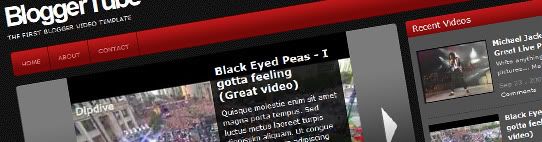
Since from the very beginning of this blog, I had in mind that most of people do not use Blogger just because of its "limitations", or whatever they think blogger has, so I have decided to creat unique templates that would blow people's minds not only because of their designs, but also for its many unique and out-of-the-box features.
Now I bring you a template that no one has never made for Blogger: a video template. Yes, now you guys can showcase your videos using blogger! ins't that awesome?
The fact is that I am very excited about this template, because this one may turn out in a revolution on Blogger templates, People will now see that Blogger is not as limited as they thought it was, believe me: I didn't even start describing its features yet.
I have been working on this template for the past weeks, finding a way to improve it each time I put my hands on it. The best thing was the help I have got from my gift-minded friends Abu Farhan and Aneesh (from Bloggerplugins.org). They are (seriously) the best and fastest Blogger developers that I have ever known, I am very lucky to get to work with this guys.
Now let me present you BloggerTube: A video template that creates a perfect link between Blogger (The best blogging tool in my opinion) and Youtube (The biggest and most used online video service on the internet).
There are many reasons for my excitement, but I can summarize them in two simple ones:
#1 - This template is totally automatic, anyone can use it, and even the most newbie guys will be able to post videos on it.
#2 - It is the first of its kind, So this will motivate me to release new version and implement new features each version.
Check out the live demo and you'll what I am talking about!
BloggerTube Instructions:
Note: A really nice user from our community (Thanks Mesothelioma) has just made this great collection of video tutorials for Bloggertuts, Please check it out, specially beginners. Make sure you watch them before asking for help!
- You'll only need 2 things: A post sample (Please download it here and save it as post sample under your Blogger settings) and a video URL from youtube.
2 - Go to Youtube.com and grab a video URL:
3 - Now head to your Blogger dashboard and create a new post, It will open up the posting page with your previously saved post sample:
4 - Note that you have 2 important elements:
- "endofvid" - Will be used to tell the template that your video URL has finished, you should paste your URL right before it, with no spaces!
- [starttext] and [endtext] - Those are your post content wrapper, so if you need to write anything, post any picture on your post, please do it inside these two lines. This is an important step, if you write anything out of these two lines, it will not be shown on your post.
5 - Here's how the your post should looks like:
I have highlighted the important elements just for your reference, but you should not do that on your posts.How to install the "Recent Videos" widget"
Just go to your Page Elements section, click to edit the HTML/Javascript Widget called "Recent Videos" and paste the following code inside:Automatic features on BloggerTube:
Once you have made your post, BloggerTube has taken care of it, let's check it out the awesome automatic features on this neat template:Automatic video thumbnails on home page:

BloggerTube will automatically create a thumbnail out of your video, and show it only on your home page, in a nice and organized gallery style.Automatic embedded video on post page:

You'll get your video automatically embedded on your post page, together with your description/post below it.Automatic slider for the last featured videos

This one may be the most cool feature of this template, it is completely mind blowing, and you doesn't even to touch the code to get it, It's already installed and running for you!BloggerTube Highlights
Custom star ratings from js-kit.com :
Recent videos widget from Bloggerplugins.org (adapted specially for this template):
Exclusive scripts from Abu-farhan.com created specially for this Blogger video template that makes it totally awesome and intelligent.
Note: if you are experiencing any problems with the page navigations, go to your Edit HTML pade, check Expand Widget models, and replace the following url:
for this one:
Read more...
BloggerTube - The first Blogger video template!
by Hafiz Haider | 5:26 AM in Top Blogger Templates | comments (1)

3 Column Blogger Template 'Nitelife' 100% Free download
by Hafiz Haider | 2:30 AM in Top Blogger Templates | comments (0)

Here is my new Blogger Template.The template comes with three column with two sidebars to the left and a nice main column.This was originally a wordpress theme by Ophelia Nicholson of ophelianicholson.com. I saw this beautiful theme today morning and decided to convert it to Blogger xml format... and completed the task in 3 hours.
Read more...
Great 3 column Blogger Template "Clean Dark" download
by Hafiz Haider | 2:22 AM in Top Blogger Templates | comments (0)

Download 3 Column nice Blogger Template "Clean Dark":
As I promised before to design more and more templates for you guys,.. here is my latest entry "Clean Dark". The design looks very professional with three columns and stylish easy navigation bar at the top.
This was originally a wordpress theme designed by some unknown guy.... I found this theme yesterday when I was searching for some good wp themes.. and this one seems good looking for me and I converted it to Blogger xml format.. I searched for the theme creator but I didn't got any information.. Ok .. anyways thanks to him.
Download
http://myblogtalk.com/bloggertemplates/cleandark/cleandark.zip Read more...
Blogger Template 'Zanblue' for you guys!
by Hafiz Haider | 2:18 AM in Top Blogger Templates | comments (0)

Here is another lovely Blogger Template for you guys... the template comes with 2 column, with excellent header image and beautiful navigation bar at the top and rare 3d rss button in the sidebar.. This was a wordpress theme design by Ophelia Nicholson.you love it!
and You can download this Gorgeous template
Download
http://myblogtalk.com/bloggertemplates/zanblue/zanblue.zip Read more...
Another 3D Blogger Template "Graffiti Art"
by Hafiz Haider | 2:06 AM in Top Blogger Templates | comments (0)

Yeah! Another Stunning Blogger Template for all of the BloggerTricks.com readers..
Over the past few days I saw so many of you guys blogging about this site and some are leaving very encouraging comments... that recharged me a bit...
so.. here's today's template "Graffiti Art".
If you have any art,design or any personal weblog, this theme well suits for your site..
As you can see,the theme was very good looking with a Gorgeous 3D header image and lovely navigation links at the top and a nice sidebar.
This template was originally a Wordpress theme by wpgalaxy.com. I converted that into Blogger Xml format and hope you all like it!
Download
http://myblogtalk.com/bloggertemplates/graffitiart/graffitiart.zip Read more...

Previously, I Converted Popular Charcoal 2 column wordpress theme into Blogger xml format.
Just a few days before, the 3 column version of the wordpress theme was released by Jinsona of web2feel.com and so many readers are leaving comments daily asking me to convert that 3 column version into Blogger template.. So, here it is guys.. the much awaited Charcoal Blogger Template with three columns is ready to download.
Download
http://myblogtalk.com/bloggertemplates/charcoal2/charcoal2.zip
Read more...
Professional Magazine style Blogger Template 'FunkyZine'
by Hafiz Haider | 2:03 AM in Top Blogger Templates | comments (0)

FunkyZine is a magazine style with stylish background,3 column, widget ready Blogger Template.
This was originally a Wordpress theme designed by ChiQ of wpthemedesigner.com
and I converted it into Blogger xml format for you guys!
Download
http://myblogtalk.com/bloggertemplates/funkyzine/funkyzine.zip Read more...
3 Column Template "Techlure" 100% Free For Blogger (BlogSpot.com)
by Hafiz Haider | 9:32 PM in Top Blogger Templates | comments (0)
Here I am.. again back with.. a great 3 Column Blogger Template for you guys!
The template is very stylish,professional looking with a nice header logo at the top and you can put adsense 728 X 15 adsense link unit at the top which will maximise your CTR and your earnings.
This was originally a wordpress theme designed by Padd IT Solutions... and I converted that wp theme into Blogger format.

Installation Instructions:
First follow the basic installation steps here.
Once you completed installing the template successfully, you have to do a few things..
1.The *psd file of the logo is supplied with the download files. Open it with photoshop, select the text layer and use the 'Text' tool to edit the 'techlure' name with your's (your blog name)

After editing the logo, save the file in *jpeg format and upload the image to any image hosting service like photobucket and copy the direct link to that image..
and replace this below url in the template code with the one you just copied and save the changes
http://i522.photobucket.com/albums/w346/charcoal2-template/techlure/background-title.jpg
2.Edit the top navigation links by simple finding the below code ( Ctrl+ F to search)

<li class='current_page_item'><a href='http://bloggertricks.com'>Home</a></li>


<li class='nl'><a href='http://blogger.com'>Blogger</a></li>


<li class='nl'><a href='http://bloggertricks.com'>Templates</a></li>


<li class='nl'><a href='http://google.com'>Google</a></li>


<li class='nl'><a href='http://gmail.com'>Gmail</a></li>
3. Edit the Rss Feedburner url by finding this code
<li class='rss'><a href='YOUR-FEEDBURNER-URL-HERE'>Subscribe RSS</a></li> 

and click on the 'edit' as shown below and paste your adsense code and SAVE THE CHANGES.

Minima Template 3 Column 100% Free
by Hafiz Haider | 9:08 PM in Top Blogger Templates | comments (0)
Click Here!
minima template is one of the most popular of blogger template. As you know defaultly minima template have two column, along with existence of newly trend that is template with 3 column, so I have modified minima template become 3 column.
Screenshot :
Defaultly for color is white, but you can change very easy. This the step, go to Layout » Font and Color and choose your color. The file download is at Zip File, so before you upload to blogger you must exstract with sofware extracter such as Winzip software or other software. Don't forget to backup your template and your widget template, for backup your template and widget template please read this post how to backup template and this post how to backup widgets template. For install, please read at this post change the template.
>LICENSE>
By downloading and using our blogger template, you agree to the following terms:
1. The template is free to download.
2. Don't delete credits link to this blog.
3. You may NOT resell the template
4. You may modify, translate or distribute all of the template.
5. You may use the template for personal or commercial projects.
Download
Click at the button below for download (3 kb):
Read more...


 Chinese
 French
 German
 Italian
 Japanese
 Korean
 Russian
 Spanish


